WordPress plugin by Sellscope

Product tabs for WooCommerce, done properly.

Add tabs like “Brewing guide”, “Sizing” or “Shipping & returns” to your products, reuse them across the catalog, and tidy up the default tabs. Coming from YIKES Custom Product Tabs? Import everything in one click.

Get it free on WordPress.org: coming soonSee Pro

Free forever on WordPress.org. Works with block and classic themes.

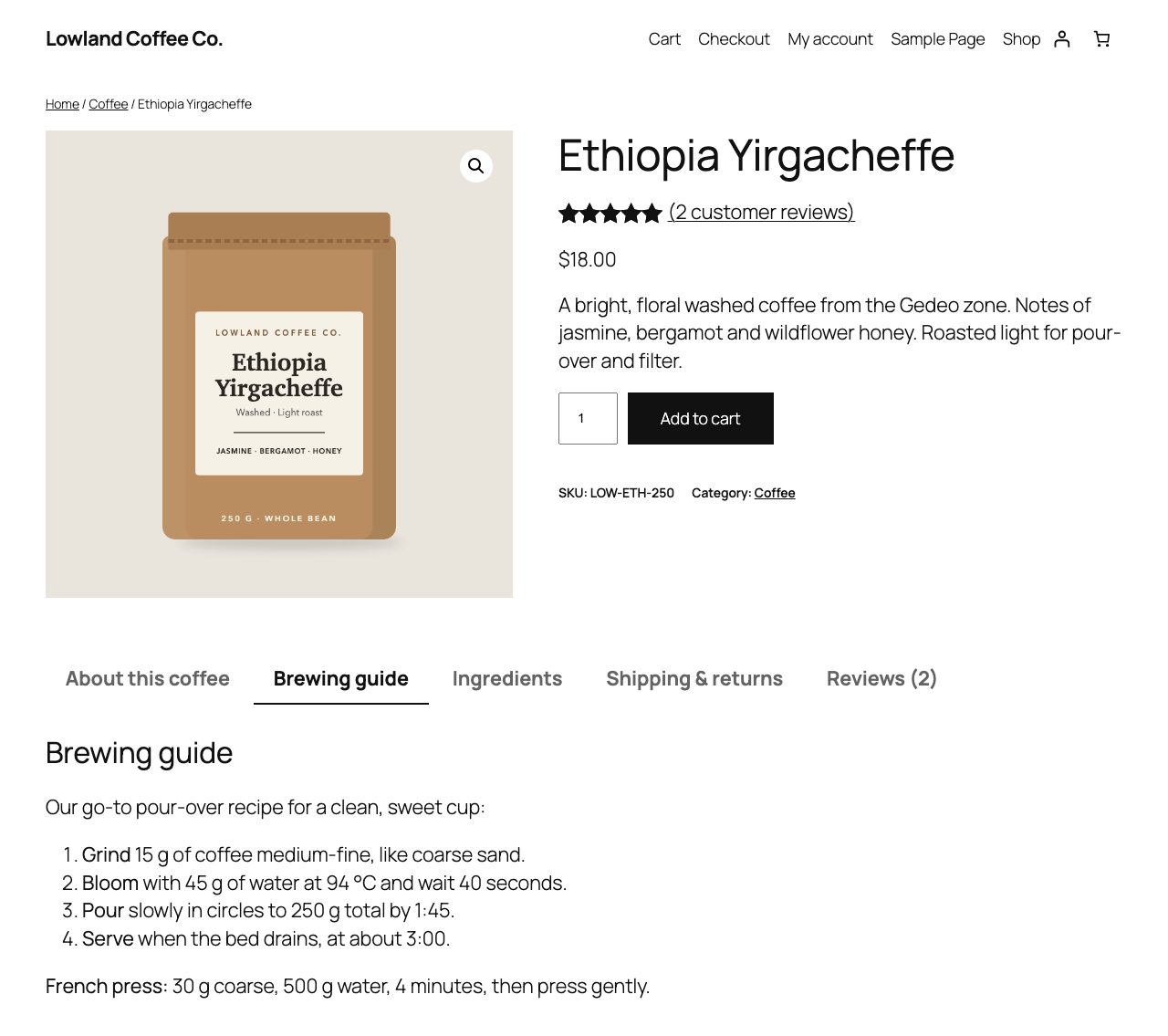
A WooCommerce product page with Tabwright tabs: About this coffee, Brewing guide, Ingredients, Shipping and returns, Reviews
Free plugin

Everything most stores need, free.

Custom tabs

Tabs per product

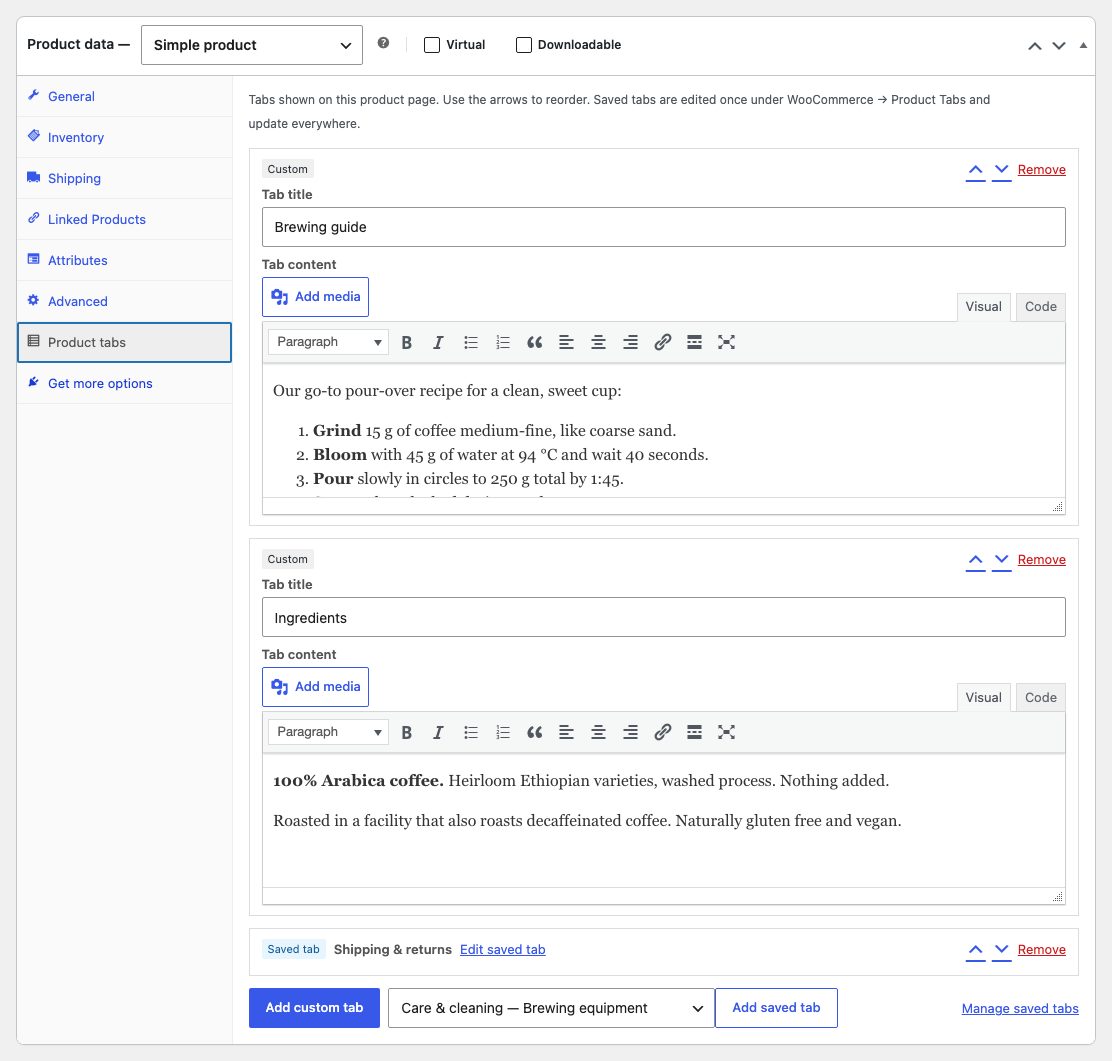
Add as many tabs as you like with the WordPress editor: text, images, lists, shortcodes and embeds.

Saved tabs

Write once, use everywhere

Create a tab like “Shipping & returns” once and attach it to any product. Edit it in one place and every product updates.

Default tabs

Rename, reorder, hide

Rename Description, Additional information and Reviews, change their order or hide them across the store.

Migration

One-click YIKES import

Moves your YIKES product tabs and saved tabs, in batches, without touching the YIKES data. Safe to run twice.

Themes

Block and classic

Built on WooCommerce’s own tabs, tested on Twenty Twenty-Five and Storefront with WordPress 7.1.

Private

No tracking, no upsell nags

The free plugin makes no external requests and collects nothing.

Pro

Tabs that show up where they should.

Rules

Conditional tabs

Show a saved tab automatically by category, tag, product type, stock status or customer role, with include and exclude rules.

FAQ

FAQ tab with schema

Question-and-answer accordions that add FAQPage structured data, once per page, only when the tab is shown.

Media

Video and downloads

Embed YouTube or Vimeo videos, and list manuals, size charts or spec sheets from your media library.

Bulk

Assign in bulk

Add or remove a saved tab on many products at once from the Products list or by rule.

Import

CSV and WP All Import

A tabs column in WooCommerce’s product CSV importer and exporter, and a field WP All Import can fill.

Schedule

Tabs with dates

Show a tab from or until a date, like a holiday shipping notice or a launch offer.

The Product tabs panel in the WooCommerce product editor
Pricing

One price a year. No per-tab or per-product limits.

Starter

$49 / year
  • 1 site
  • All Pro tab types and rules
  • Updates and email support for a year
Buy Starter: coming soon

Business

$99 / year
  • Up to 5 sites
  • All Pro tab types and rules
  • Updates and email support for a year
Buy Business: coming soon

Agency

$199 / year
  • Unlimited sites
  • All Pro tab types and rules
  • Updates and email support for a year
Buy Agency: coming soon

Prices in USD; taxes are added at checkout where they apply. Payments are processed by Freemius, our merchant of record. 14-day money-back guarantee: see the refund policy.

FAQ

Questions

Is the free version really free?

Yes. Everything in the free plugin on WordPress.org works without limits: unlimited custom and saved tabs, default tab controls and the YIKES importer. Pro is a separate plugin you add on top.

How do I move from YIKES Custom Product Tabs?

Install Tabwright, go to WooCommerce → Product Tabs → Import from YIKES, check the preview and click Import. Your YIKES data isn’t changed, so you can check everything before you deactivate YIKES.

Does it work with my theme?

Tabwright uses WooCommerce’s own product tabs, so it works with block themes like Twenty Twenty-Five and classic themes like Storefront. It needs WordPress 6.5+, WooCommerce 8.0+ and PHP 7.4+.

How is Pro licensed?

Pro is a yearly license for 1, 5 or unlimited sites, with updates and support for the year. It renews automatically; you can cancel anytime and keep using the version you have.

Can I get a refund?

Yes. Ask within 14 days of buying Pro for a full refund. See the refund policy.

Does Tabwright collect data?

The free plugin makes no external requests and collects nothing. Pro checks its license with Freemius, our merchant of record, which sees your site address and license key.

Step-by-step: moving from YIKES Custom Product Tabs →